Using the MSR-1 buzzer
Your Apollo MSR-1 has an onboard piezo buzzer that can play short tunes. In this guide, you play one from Home Assistant to hear it for yourself. Once it works, you can use the same action in your Home Assistant automations.
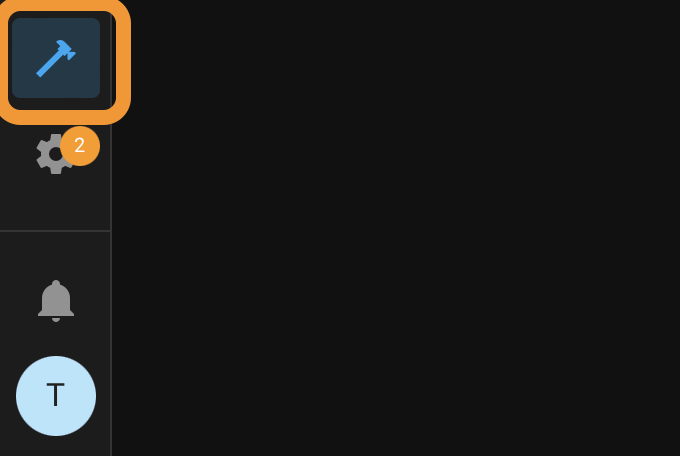
1. Open Home Assistant and go to Developer tools in the bottom left of the sidebar (Settings → Tools in Home Assistant 2026.8 and newer).

2. Click Actions at the top of the page. Older Home Assistant versions call this tab Services.
3. Choose your MSR-1's buzzer action. Start typing buzzer to find it faster.
4. Paste an RTTTL tune into the song_str field. RTTTL is a plain-text ringtone format. Expand one of the two samples below and copy it:
Mario
smb:d=4,o=5,b=100:16e6,16e6,32p,8e6,16c6,8e6,8g6,8p,8g,8p,8c6,16p,8g,16p,8e,16p,8a,8b,16a#,8a,16g.,16e6,16g6,8a6,16f6,8g6,8e6,16c6,16d6,8b,16p,8c6,16p,8g,16p,8e,16p,8a,8b,16a#,8a,16g.,16e6,16g6,8a6,16f6,8g6,8e6,16c6,16d6,8b,8p,16g6,16f#6,16f6,16d#6,16p,16e6,16p,16g#,16a,16c6,16p,16a,16c6,16d6,8p,16g6,16f#6,16f6,16d#6,16p,16e6,16p,16c7,16p,16c7,16c7,p,16g6,16f#6,16f6,16d#6,16p,16e6,16p,16g#,16a,16c6,16p,16a,16c6,16d6,8p,16d#6,8p,16d6,8p,16c6
Cantina
Find more tunes in this list of RTTTL ringtones, and test them in an online RTTTL player before you send them to your MSR-1.
5. Click the Perform action button in the bottom right.
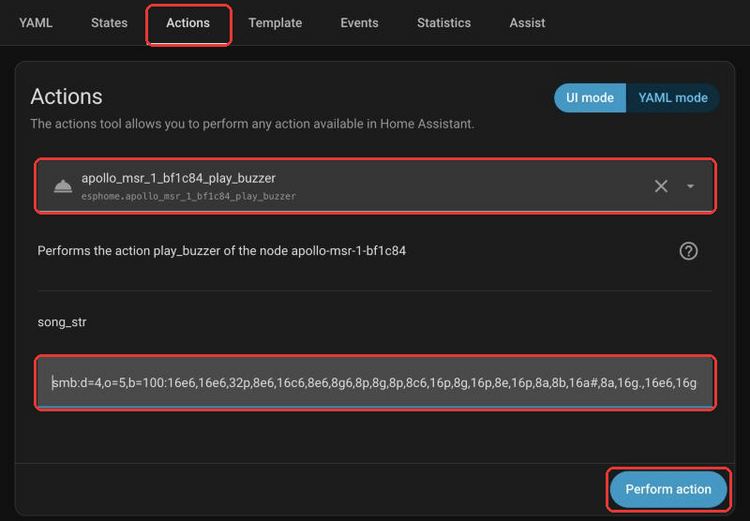
Your MSR-1 plays the tune.
Play a tune from an automation
The same action works in your Home Assistant automations. When you build an automation, add an action, choose your MSR-1's buzzer action, and paste the tune into the song_str field.