Putting the CAST-1 in boot mode
This will cover how to put the CAST-1 into boot mode.
This is needed to force the device into boot mode to reflash the firmware. Both methods do the same thing, so use whichever is easier for you.
Method 1: Boot button only
1. With the CAST-1 unplugged, hold down the boot button (on the left) while plugging a USB-C data cable into the CAST-1. Once connected, release the button.

2. You are now ready to reflash your device!
Click here to go to the reflashing guide!
Method 2: Boot and reset buttons
This method puts your device into boot mode with the boot and reset buttons.
1. Plug a USB-C cable that supports power and data into your computer and connect the other end to your CAST-1.
2. Locate the boot and reset buttons on the CAST-1.
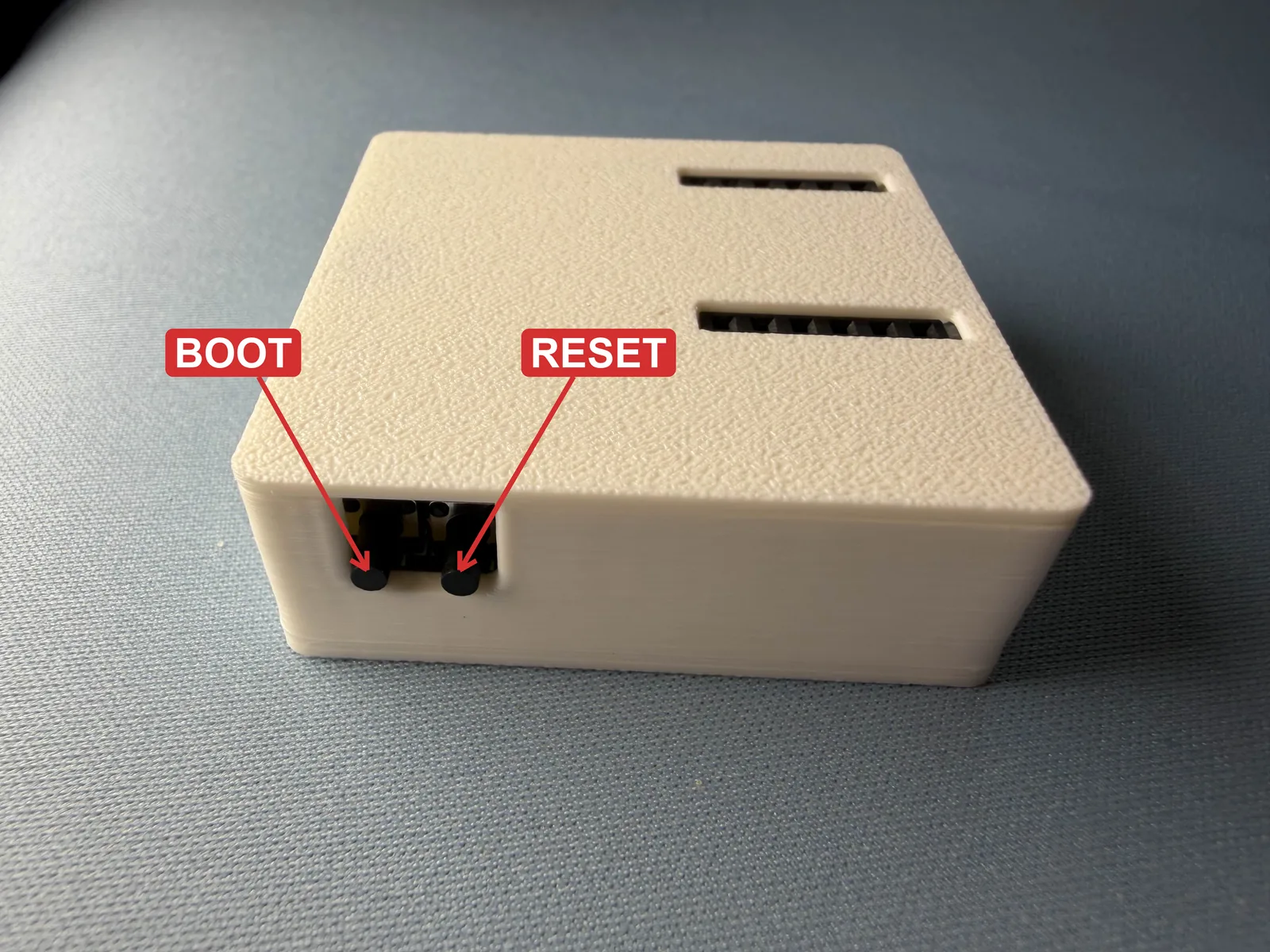
3. Put your CAST-1 in boot mode. Use both buttons, in this order:
- Press and hold the boot button (on the left). Keep holding it.
- While you're still holding boot, press and release the reset button (on the right).
- Let go of boot.
Keep holding boot the whole time
Pressing reset by itself only restarts the CAST-1. It goes into boot mode only when boot is held down while you press and release reset.

4. You are now ready to reflash your device!