SEN65 air quality sensor
The Sensirion SEN65 is an all-in-one air quality sensor. One module measures particulate matter, temperature, humidity, volatile organic compounds (VOCs), and nitrogen oxides (NOx), and it plugs straight into the Breakout Module's SEN6x port. Grab one from the Apollo store.
It's part of Sensirion's SEN6x family. The SEN65 does not read CO₂ or formaldehyde, those are on other variants like the SEN66 (adds CO₂) and SEN68 (adds formaldehyde).
Attach SEN65
The SEN65 comes with its own ribbon cable. Plug it into the SEN6x port at the bottom right of the Breakout Module, latch side facing up. The connector is keyed, so it only fits one way.

The SEN6x port is on the same I2C bus as the other connectors: SCL on GPIO0, SDA on GPIO1.
Add to ESPHome Device Builder
The SEN65 needs three components in your device config: the accessory power switch that powers the breakout, the I2C bus the sensor talks on, and the SEN6x component that reads it. If another module already added the I2C component, skip steps 4 to 6, the SEN65 shares the same bus.
- Open your starter kit device in Device Builder and click Edit.
-
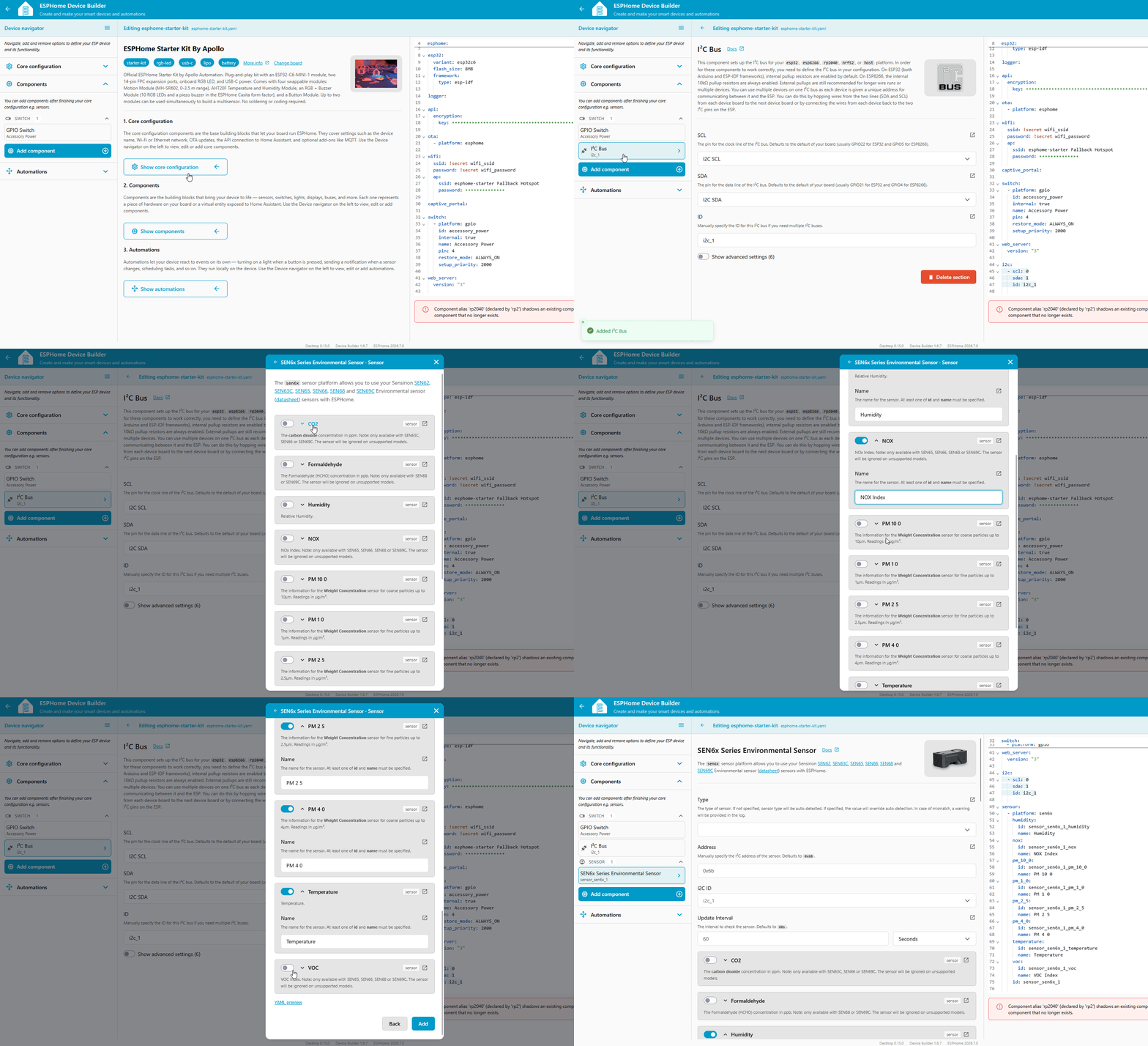
Navigate to the Components section and look for a GPIO Switch named Accessory Power. The breakout and everything plugged into it get their power from that switch, so without it the SEN65 never answers on the I2C bus. (1)
- Projects you created from the Apollo ESPHome Starter Kit board already include it, and the component picker hides it once your device has it. That's why it isn't in the list of components you can add.
-
If it isn't there, click Add component, find the Accessory Power Rail card, and click Add. (1)
- Accessory Power Rail covers what the switch does and the settings worth knowing about.
-
Click Add component.
-
Select the I2C component. Set SCL to pin 0 and SDA to pin 1, and turn on the pullup toggle for both pins. (1)
- New to I2C? What is I2C? explains the bus, addresses, and pullups in beginner terms.
-
Click Add. Device Builder inserts the I2C bus into your YAML.
- Click Add component again and select the SEN6x component. It sits on the I2C bus at address
0x6B. -
Toggle on the SEN65's readings: Temperature, Humidity, VOC Index, NOX Index, PM 1 0, PM 2 5, PM 4 0, and PM 10 0. (1)
- You'll also see CO2 and Formaldehyde in the list. The SEN65 doesn't measure those, they belong to other SEN6x models, so leave them off. And you don't have to turn everything on, toggle only the readings you want.
-
Click Add, then flash the device. The SEN65's readings show up alongside your other entities.
Want a single air quality number on top of the individual readings? Add the AQI component too, see NowCast AQI below.
What the SEN65 YAML does
Adding the SEN6x component, plus an AQI sensor for the NowCast AQI below, gives you a config like this:
i2c:
  sda: GPIO1
  scl: GPIO0
  scan: true

sensor:
  - platform: sen6x
    type: SEN65
    address: 0x6B
    update_interval: 60s
    pm_1_0:
      name: "PM <1µm"
    pm_2_5:
      id: sen65_pm_2_5
      name: "PM <2.5µm"
    pm_4_0:
      name: "PM <4µm"
    pm_10_0:
      id: sen65_pm_10_0
      name: "PM <10µm"
    temperature:
      name: "Temperature"
    humidity:
      name: "Humidity"
    voc_index:
      name: "VOC Index"
    nox_index:
      name: "NOx Index"

  - platform: aqi
    name: "NowCast AQI"
    pm_2_5: sen65_pm_2_5
    pm_10_0: sen65_pm_10_0
    calculation_type: AQI
Each option does something specific:
| Option | What it does |
|---|---|
| I2C bus | |
i2c.sda: GPIO1 / scl: GPIO0 |
The breakout's shared I2C data and clock pins. |
i2c.scan: true |
Logs any I2C devices found on boot, handy for confirming the SEN65 is detected. |
| SEN65 sensor | |
platform: sen6x |
The ESPHome component for Sensirion's SEN6x family. |
type: SEN65 |
Tells the component which variant you have, so it reads only the sensors the SEN65 has. |
address: 0x6B |
The SEN65's fixed I2C address. |
update_interval: 60s |
How often it takes a reading. |
pm_2_5.id / pm_10_0.id |
Internal handles so the AQI sensor can read these two PM values. |
| NowCast AQI | |
platform: aqi |
Calculates a single Air Quality Index number from PM readings. |
pm_2_5 / pm_10_0 |
Point the AQI sensor at the two PM handles above. |
calculation_type: AQI |
Use the US EPA AQI formula. |
name: NowCast AQI |
Named this way because it's based only on PM, not the full pollutant set a real AQI uses. |
The SEN65 needs about a minute after boot to warm up before the VOC and NOx readings settle.
Sensor readings
| Reading | Details |
|---|---|
| PM <1µm | Ultra-fine particles smaller than 1 micrometer, often from smoke, cooking, or exhaust. |
| PM <2.5µm | PM2.5, fine particles from combustion and industrial activity. The most widely tracked for health. |
| PM <4µm | Particles smaller than 4 micrometers. |
| PM <10µm | PM10, includes dust, pollen, and mold. |
| Temperature | Ambient air temperature. Runs a little warm right after power-on while the sensor settles. If it reads high all the time, add an offset. |
| Humidity | Relative humidity in the air. Reads low when the temperature reads high, an offset fixes both. |
| VOC Index | Volatile organic compounds from paints, cleaning products, and cooking, on a relative scale where 100 is your recent average. How the VOC Index works. |
| NOx Index | Nitrogen oxides from gas stoves and other combustion, on the same kind of relative scale where 1 is the baseline. How the NOx Index works. |
Safe levels
Particulate matter
Per the EPA, particulate matter is a mix of solid particles and liquid droplets in the air. The smaller the particle, the deeper it reaches into your lungs, so PM1 and PM2.5 matter most indoors where cooking, candles, and poor ventilation are the usual sources. (1)
- Trigger a fan, air purifier, or HVAC when PM2.5 climbs. Keeping PM2.5 below 9 µg/m³ indoors is a good general target, below 5 µg/m³ for ideal long-term health.
| PM2.5 (µg/m³) | AQI Category | What it means |
|---|---|---|
| 0.0 – 9.0 | Good | Air quality is satisfactory. |
| 9.1 – 35.4 | Moderate | Acceptable; some risk for sensitive people. |
| 35.5 – 55.4 | Unhealthy for Sensitive Groups | Risk for those with heart or lung issues, children, older adults. |
| 55.5 – 125.4 | Unhealthy | Everyone may start to feel effects. |
| 125.5+ | Very Unhealthy to Hazardous | Health alert. |
NowCast AQI
Comparing µg/m³ values across PM1, PM2.5, PM4, and PM10 gets fiddly. The AQI component folds your PM2.5 and PM10 into a single 0-500 number that maps to the categories in the table above: bigger is worse.
- In Device Builder, click Add Component and select the AQI component.
- Set Calculation Type to AQI, or CAQI if you're in Europe.
- Pick your SEN65's PM sensors in the PM 10 0 and PM 2 5 dropdowns.
- Enter
NowCast AQIfor the Name, then click Add and flash the device.
Rename the entity to NowCast AQI
A real Air Quality Index also factors in ozone, carbon monoxide, and other gases the SEN65 doesn't measure. Naming the entity NowCast AQI keeps it honest about what it's based on. It's still the easiest single value to automate on: fire an alert at 100 (Moderate) or 150 (Unhealthy for Sensitive Groups) and anyone in the house understands why.
VOC and NOx
Both are relative scales that behave like your nose, comparing the current air to the sensor's recent history rather than reporting an absolute amount. On the VOC Index, 100 is your recent average, so a reading above 100 means more VOCs from cooking, cleaning, or breathing. (1) The NOx Index uses 1 as its baseline, and anything above it usually means combustion like a gas stove. (2)
- Run a fan or send an alert when the VOC Index rises above 100. It reacts to the change in your space rather than an absolute number.
- Kick on the range hood or a fan when the NOx Index climbs past 1, handy while cooking on gas.
Temperature and humidity offsets
If the SEN65's temperature or humidity doesn't agree with another thermometer or hygrometer in the room, the sensor is probably fine. Sensirion calibrates every unit at the factory to a typical accuracy of ±0.45 °C and ±4.5 %RH, but it samples the air right next to a powered ESP32, and that heat pushes the temperature reading up a little. Humidity then reads low, because relative humidity drops as air warms. (1) Every install runs a slightly different amount warm, so Sensirion leaves this correction to the device builder, and in ESPHome that's a one-line offset in your YAML.
- Sensirion's SEN6x temperature compensation application note explains the self-heating effect and the math behind correcting it.
Measure your offsets
Let the kit run in its normal spot for at least half an hour, out of sunlight and away from vents. Put a thermometer you trust next to it and note how far off each reading is. Reading 23.5 °C in a 21.5 °C room means your temperature offset is 2 °C. One caution on the reference: dial-style analog hygrometers are commonly off by ±5 %RH or more, so a disagreement with one of those may say more about the dial than the SEN65.
Fixed offsets
Open your device in Device Builder, click Edit, and add a filters: block under temperature: and humidity: in the sen6x component:
    temperature:
      name: "Temperature"
      filters:
        - offset: -2.0
    humidity:
      name: "Humidity"
      filters:
        - offset: 5.0
The offset filter adds its value to every reading: a temperature that reads 2 °C high gets -2.0, a humidity that reads 5 % low gets 5.0. Save, install, and the corrected values flow to Home Assistant.
Adjustable offsets from Home Assistant
Apollo's AIR-1 exposes its offsets as number entities instead, so you can dial them in from the device page in Home Assistant without reflashing. The same trick works on the starter kit. (1)
- ESPHome's sen6x component doesn't yet expose the on-sensor compensation commands from Sensirion's application note, so filters in YAML are the way to do this today.
Full SEN65 config with adjustable offsets
This is the complete SEN65 block from earlier on this page with the offsets added. Two things changed: each of temperature: and humidity: gained a filters: block, and a new number: section at the bottom creates the two offset boxes. Compare it with your own YAML and copy over those parts, or replace your whole sensor: block with this one. If you added the NowCast AQI sensor, keep that entry too.
sensor:
  - platform: sen6x
    type: SEN65
    address: 0x6B
    update_interval: 60s
    pm_1_0:
      name: "PM <1µm"
    pm_2_5:
      id: sen65_pm_2_5
      name: "PM <2.5µm"
    pm_4_0:
      name: "PM <4µm"
    pm_10_0:
      id: sen65_pm_10_0
      name: "PM <10µm"
    temperature:
      name: "Temperature"
      filters:
        - lambda: return x - id(sen65_temperature_offset).state;
    humidity:
      name: "Humidity"
      filters:
        - lambda: return x - id(sen65_humidity_offset).state;
    voc_index:
      name: "VOC Index"
    nox_index:
      name: "NOx Index"

number:
  - platform: template
    name: "SEN65 Temperature Offset"
    id: sen65_temperature_offset
    restore_value: true
    initial_value: 0.0
    min_value: -70.0
    max_value: 70.0
    entity_category: "CONFIG"
    unit_of_measurement: "°C"
    optimistic: true
    update_interval: never
    step: 0.1
    mode: box
  - platform: template
    name: "SEN65 Humidity Offset"
    id: sen65_humidity_offset
    restore_value: true
    initial_value: 0.0
    min_value: -70.0
    max_value: 70.0
    entity_category: "CONFIG"
    unit_of_measurement: "%"
    optimistic: true
    update_interval: never
    step: 0.1
    mode: box
These offsets are subtracted from the raw reading, so the box holds the amount the sensor reads high: reading 2 °C warm, set SEN65 Temperature Offset to 2.0. A humidity that reads 5 % low gets -5.0. Both values survive a reboot.
New to ESPHome? We're here to help.
Stuck on a step or want to show off what you built? Ask questions and share projects with the Apollo community.