Hot water recirculation with TEMP-1
Running this on a TEMP-1B
This loop needs the probe reporting every few seconds, so it has to stay powered. Run your TEMP-1B on USB power with Prevent Sleep turned on, or use a mains-powered TEMP-1. On battery with deep sleep, it can't react fast enough to switch the valve in time.
Contributed by Donovan
Big thanks to Donovan for building this and sharing his whole setup, automations included, so we could package it up as the blueprint below.
There are two normal ways to get hot water at a sink, and each has a catch. A small under-sink tank gives you instant hot water with very little energy, but it runs out after a gallon or two. The main house water heater never runs out, but you either wait while cold water runs down the drain, or you get a cold-water sandwich when the tank water hands off to the line water.
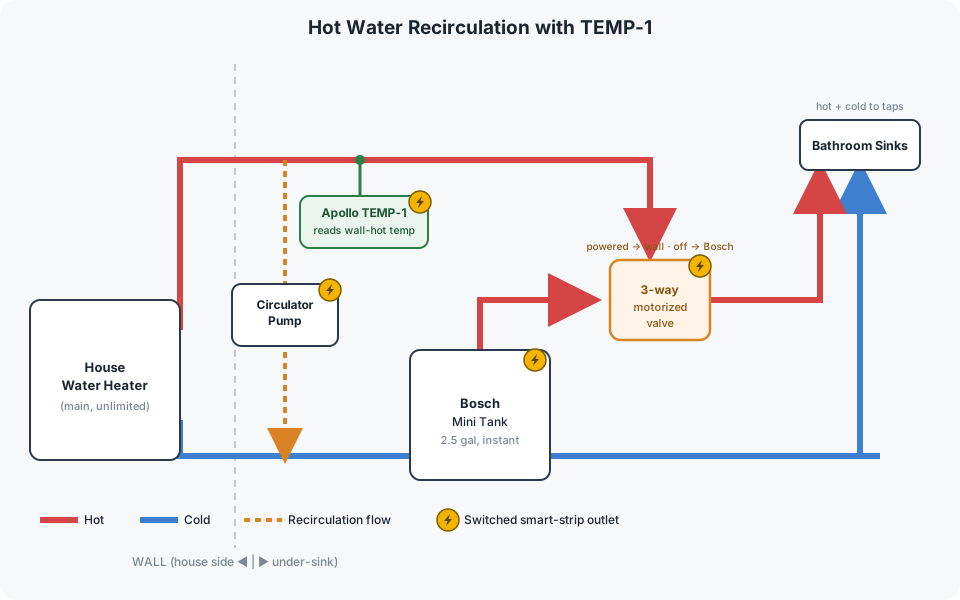
Donovan's setup uses an Apollo TEMP-1 to get both. Small draws come from a 2.5 gallon Bosch mini tank. When he knows he needs more, a button starts a recirculation loop that pulls hot water up from the house heater without running the tap, and the TEMP-1 tells Home Assistant the moment that line is hot enough to switch over. No water goes down the drain, and there is no cold-water sandwich.
How it works
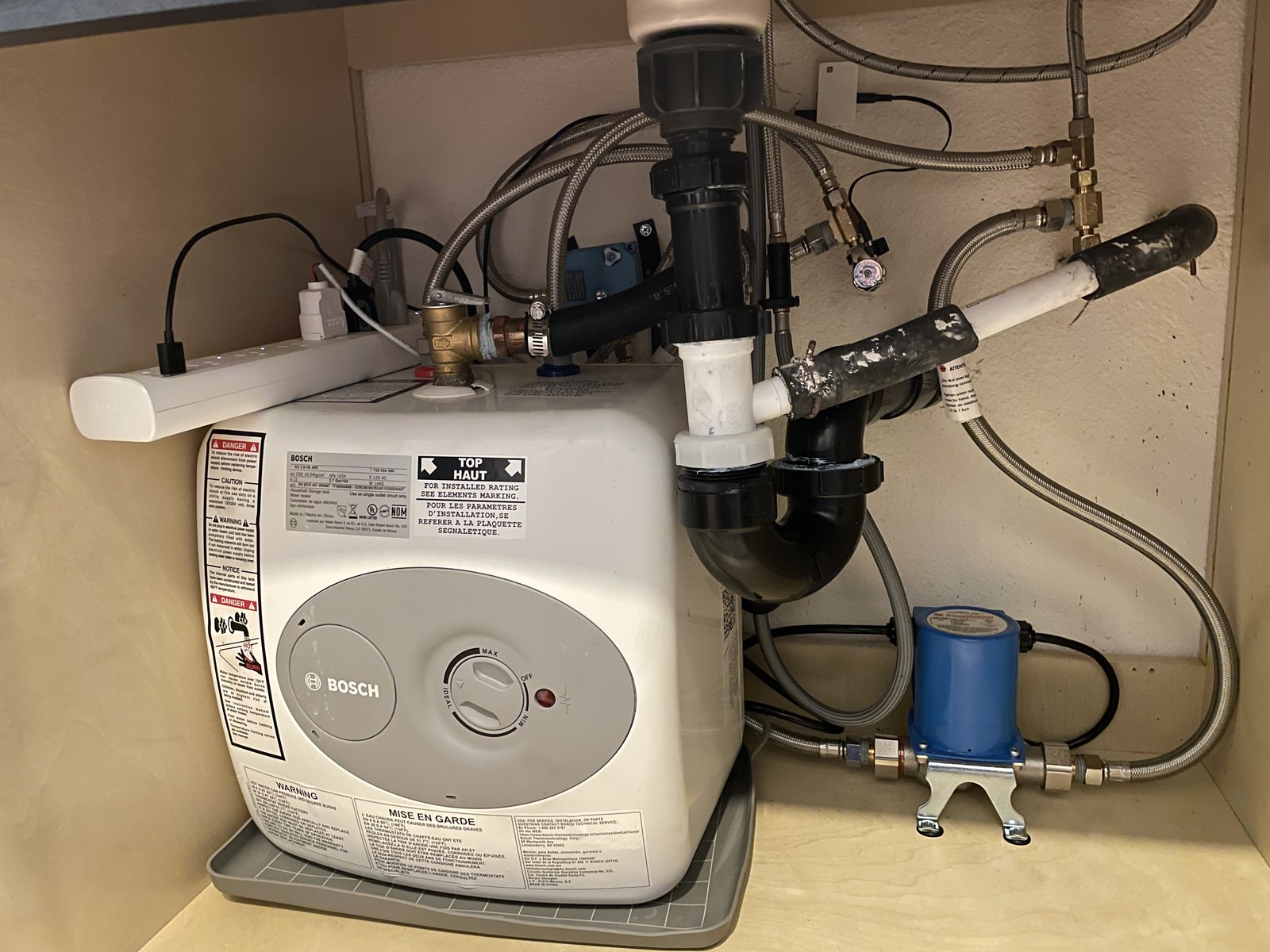
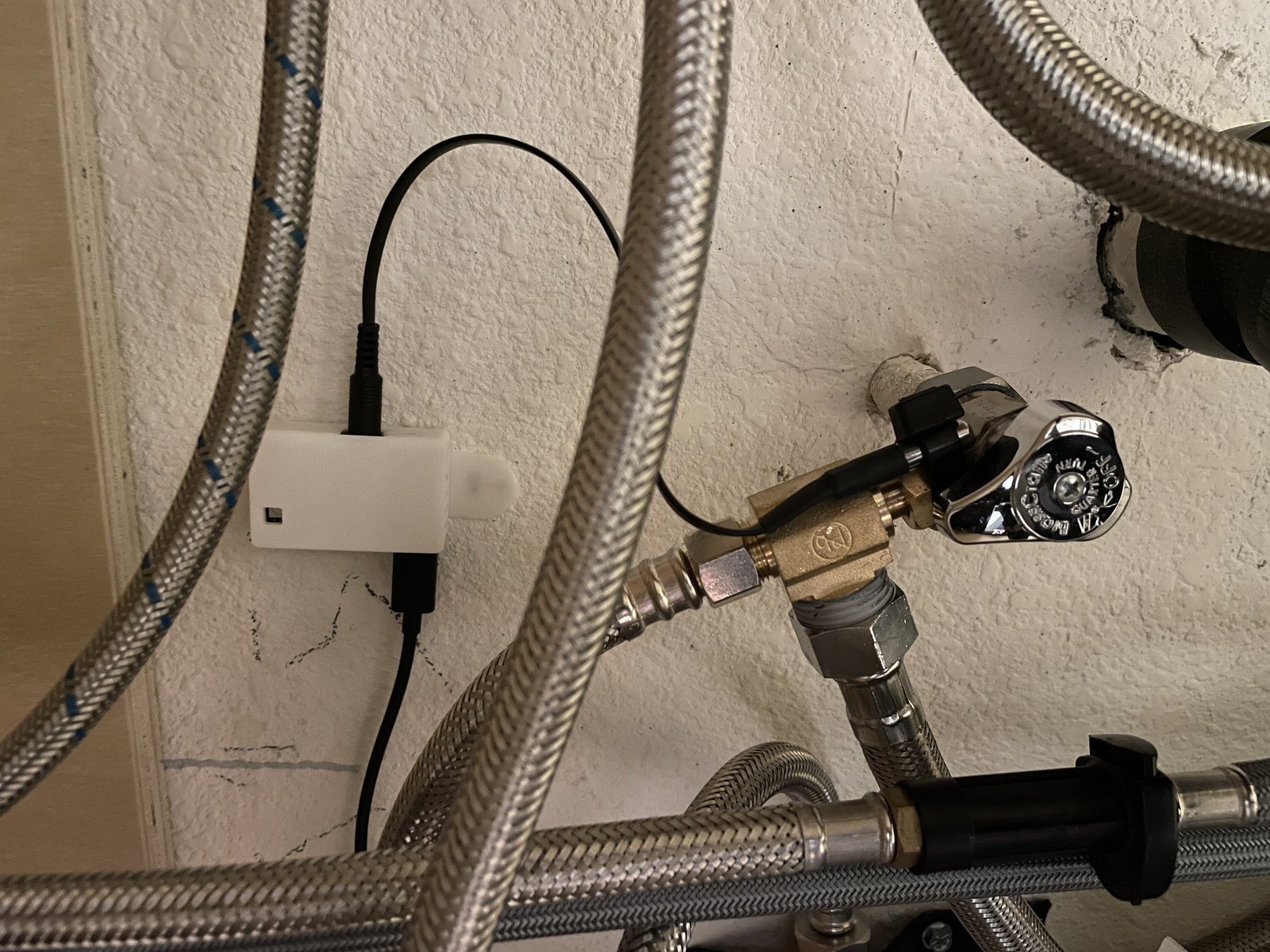
The TEMP-1 probe is zip-tied to the hot-water angle stop, so it reads the temperature of the hot line coming from the house heater. Everything else, the Bosch tank, the circulator pump, the motorized valve, and the TEMP-1 itself, plugs into a Kasa smart power strip that Home Assistant controls.
- Idle. The 3-way valve is unpowered, so the sinks are fed by the Bosch mini tank. Instant hot water, low energy.
- Request hot water. Donovan presses an Aqara Zigbee button when he knows he'll use more than a gallon or two.
- Recirculate. Home Assistant switches the circulator pump on. It pumps the cooled water from the hot line back into the cold line, pulling fresh hot water up from the house heater. Nothing runs down the drain.
- Watch the line. The TEMP-1 reports the angle-stop temperature every few seconds. The pump also has its own temperature sensor, and the smart strip watches its energy use, so the system knows when the pump finishes.
- Switch over. Once the line is hot, Home Assistant powers the valve so the sinks draw from the house heater, and shuts the pump outlet off so it won't run again when the water cools. Alexa announces "The hot water is ready."
- Revert. When the TEMP-1 sees the line drop below a set temperature, Home Assistant cuts power to the valve. A capacitor inside the valve stores just enough energy to rotate it back, so the sinks return to the Bosch tank.
Physical layout
Here's the real thing under Donovan's sink: the Bosch mini tank with the smart strip on top, the 3-way valve strapped to the wall behind it, and the circulator pump bolted to the floor on the right.
Control logic
flowchart LR
    IDLE["Idle:<br/>Bosch feeds the sinks<br/>(valve off)"]
    PUMP["Pump ON:<br/>recirculate the wall loop,<br/>no water wasted"]
    Q1{"Wall line<br/>up to temp?"}
    WALL["Valve powered:<br/>house heater feeds the sinks<br/>(Alexa: hot water ready)"]
    Q2{"Wall line<br/>cooled off?"}

    IDLE -->|press Aqara button| PUMP --> Q1
    Q1 -->|no| PUMP
    Q1 -->|yes| WALL --> Q2
    Q2 -->|no| WALL
    Q2 -->|"yes: valve off, back to Bosch"| IDLE

    classDef bosch fill:#4379AA,stroke:#2d5a8a,color:#fff;
    classDef wall fill:#d64545,stroke:#a83232,color:#fff;
    classDef temp fill:#2e7d46,stroke:#1f5630,color:#fff;
    class IDLE bosch;
    class WALL wall;
class Q1,Q2 temp;Parts
| Part | Role in the loop |
|---|---|
| Apollo TEMP-1 + short temperature probe | Reads the hot line at the angle stop and reports it to Home Assistant |
| Bosch ES2.5 mini tank (2.5 gal, 120 V) | Instant hot water for small draws |
| AquaMotion AMH3K-7N circulator pump | Recirculates the loop to pull hot water up from the house heater |
| US Solid 1/2" 3-way L-type motorized ball valve | Selects the hot source: unpowered feeds the Bosch, powered feeds the house heater |
| Smart plugs with power monitoring (we suggest Zooz Z-Wave, like the ZEN04; Donovan used a TP-Link Kasa strip) | Switch the pump and valve, and report the pump's power so Home Assistant knows when it finishes |
| Aqara wireless mini switch (Zigbee) | The "I want hot water" button |
| Alexa speaker | Announces when the line is ready |
TEMP-1 configuration
For this to react quickly, the probe needs to report faster than its 60 second default. Donovan reports it every 3 seconds and keeps a 60 second heartbeat, so Home Assistant reacts fast while you can still tell at a glance that the probe is alive. Two guards keep the data clean: the 85.0 reading a DS18B20 sends at power-on is dropped, and readings are ignored when the Select Probe option is set to Food.
The probe zip-ties straight onto the hot-water angle stop, so it reads the line coming from the house heater.
For the full walkthrough of overriding probe YAML in the ESPHome Builder, including the simpler delta-plus-heartbeat pattern, see How To Change The Temperature Probe Update Interval.
sensor:
  - platform: dallas_temp
    id: !extend temp_probe
    update_interval: 3s
    filters:
      - lambda: |-
          if (isnan(x)) {
            return NAN;
          }
          if (x == 85.0) {
              return NAN;
          }
          auto selected_probe = id(temp_probe_select).current_option();
          if (selected_probe == "Food") {
            return NAN;
          }
          return x - id(dallas_temperature_offset).state;
      - or:
          - delta: 1.1    # ~2°F; change to 2.0 for 2°C (~3.6°F) instead
          - heartbeat: 60s
Set it up in Home Assistant
Donovan's whole system is one blueprint. Import it, pick your entities, set your temperatures, and save. There are no helpers to create and no automations to copy and rename.
Before you import
Two things need to be in place: your TEMP-1 probe should report quickly (see TEMP-1 configuration above), and your pump and valve should be on smart plugs Home Assistant can switch, with power monitoring on the pump.
Import the blueprint
1. Click the button below, then click Open link.

2. Click Preview, then Import blueprint.
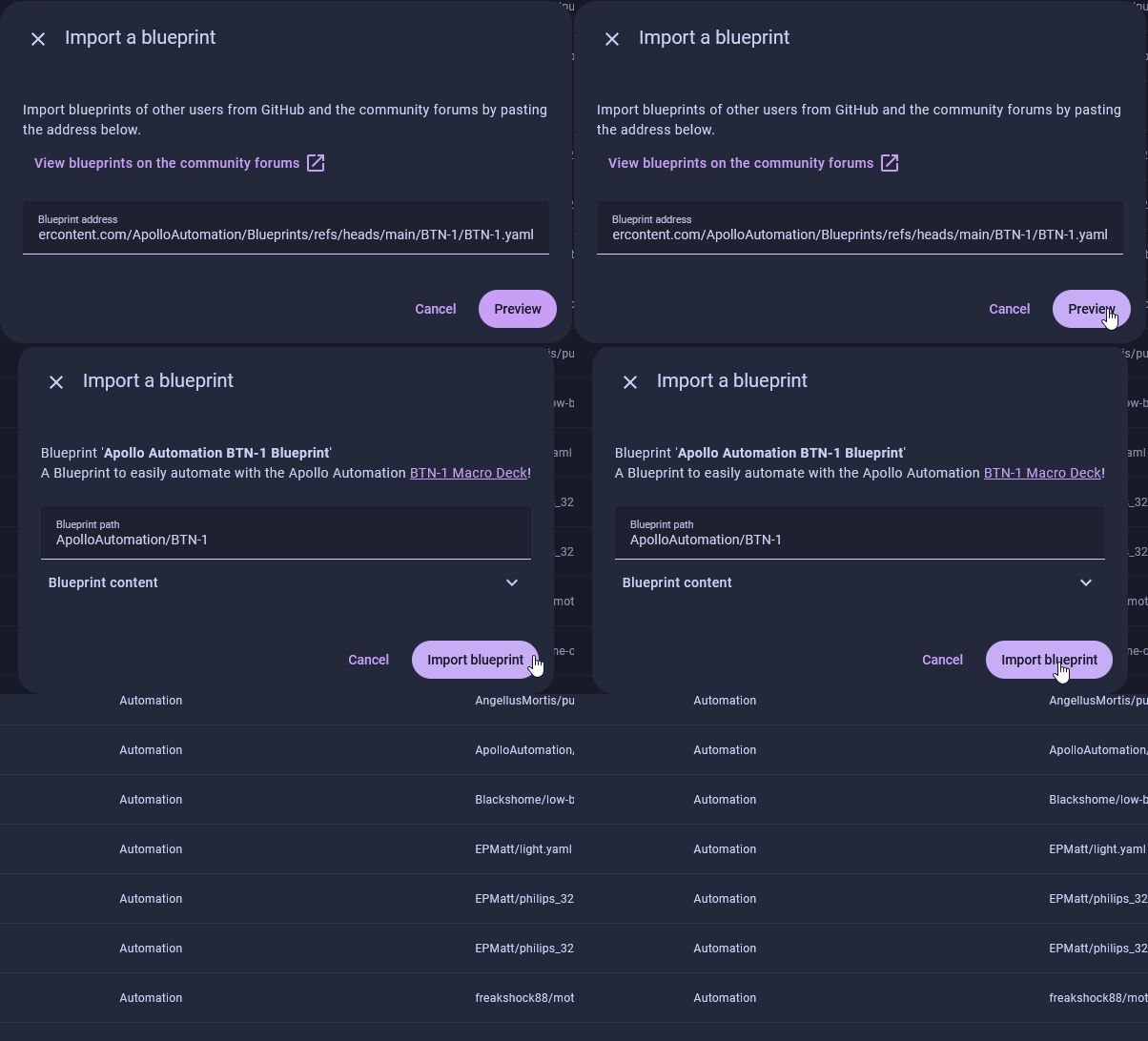
3. Click Apollo Automation Hot Water Recirculation (TEMP-1), create an automation from it, and fill in the inputs below.
What you'll fill in
| Input | What to pick |
|---|---|
| Start trigger | The press that starts a cycle, like your Aqara button's single click. Pick it from the trigger editor like any automation. You can add more than one (see the tip below). |
| Circulator pump plug | The smart plug powering the pump. |
| Circulator pump power | That plug's power (W) sensor, how the system knows the pump has finished. |
| 3-way valve plug | The smart plug powering the valve. |
| Hot line temperature (TEMP-1) | Your TEMP-1 probe. |
| Activate / Return temperature | When to switch to the house heater, and when to revert. Both default to 90 °F. |
| Pump finished below (W) | The power level that means the pump's thermostat cut the motor. Default 20 W. |
| Pump / Valve safety timeout | Backstops that force the pump and valve off if a signal is missed. Default 5 and 60 minutes. |
| Actions when the water is ready | Optional. Runs the moment the valve opens: announce on a speaker, turn on the shower fan, flash a light. |
Starting by button, voice, or dashboard
The blueprint runs a cycle whenever the Start trigger fires, so it works with whatever you give it. Add your button's single-press for the physical button. To also start from a dashboard tap or a voice assistant (Donovan uses a Nabu Casa voice command), add a second trigger: your pump plug turning on. Then tapping that plug on a card, or saying "turn on the circulator," kicks off the whole cycle.
Tuning
Both temperatures default to 90 °F. The probe reads the outside of the angle stop through a zip-tie, so it lags the water by a few degrees. Nudge Activate up if the valve flips before the water is genuinely hot, or down if you're left waiting.
Pump finished below should sit under the pump's running draw but above its standby. 20 W suits the AquaMotion AMH3K; check yours on the plug's power sensor.
The two safety timeouts are backstops. If a signal is ever missed, the pump and valve still shut themselves off, so the 5 and 60 minute defaults are deliberately generous.
Donovan's extras
Donovan also flashes the shower lights as a silent "ready" cue, and ties his shower exhaust fan into a Moen Flo that switches it off once the shower's water stops. Both drop straight into the Actions when the water is ready slot, alongside (or instead of) the spoken announcement.