Sensor Definitions
Once added to Home Assistant you can configure different settings for your AIR-1. Use the tabs below to see what each entity does, grouped the same way Home Assistant displays them.
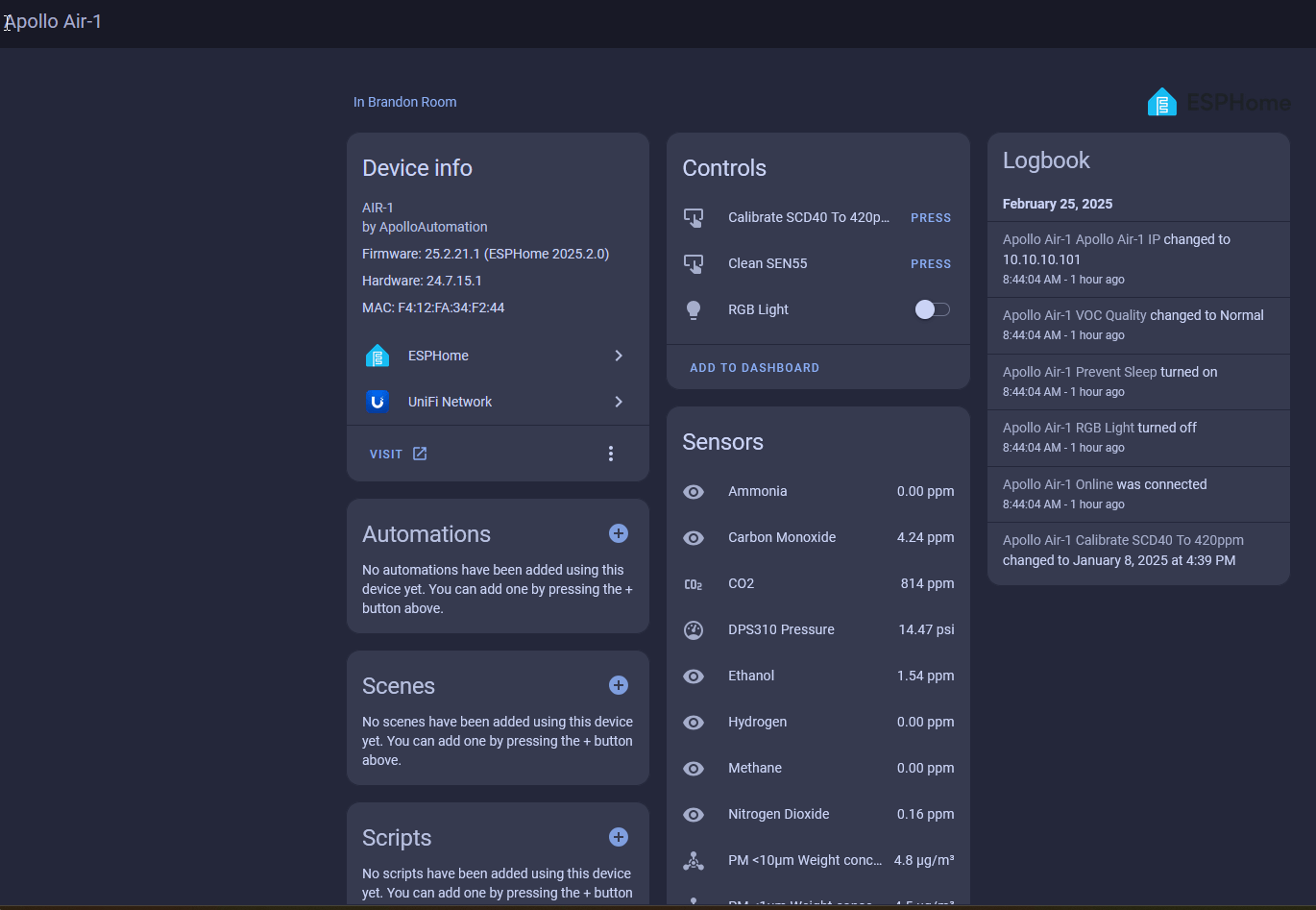
How often readings update
The Default Update column is how often each sensor refreshes while the AIR-1 is awake. By default Prevent Sleep is on, so the device stays awake and reports continuously at these intervals. Turn Prevent Sleep off to let the AIR-1 deep-sleep between readings for more accurate onboard SEN55 temperature and humidity (the ESP chip's heat skews them while it is awake); it then wakes for about 2 minutes, reports, and sleeps for the Sleep Duration.
To update firmware on a sleeping device, just click Update on the Firmware Update entity and it installs the next time the device wakes (the firmware keeps itself awake until the update finishes, so you don't need to do anything else). The optional OTA helper is a separate toggle that overrides Prevent Sleep to keep a device awake on demand.
| Control | What it does |
|---|---|
| RGB Light | Three RGB Neopixel LEDs. Click the light bulb or color wheel to change the color. Use the toggle to turn them on or off. |
| Calibrate SCD40 To 420ppm | Forces a fresh-air calibration of the SCD40 CO₂ sensor to the outdoor baseline (about 420 ppm). Run it outdoors or next to an open window. Only needed when CO2 Auto Calibration is off. |
| Clean SEN55 | Runs the SEN55 fan auto-clean cycle to clear the particulate sensor and refresh its readings. |
| Sensor | Default Update | Details |
|---|---|---|
| Carbon Dioxide (CO₂) | 60s | True NDIR reading from the SCD40. Shows Unknown if you do not have the CO₂ module. You can re-calibrate it to the outdoor baseline. |
| SEN55 Temperature | 10s | Ambient air temperature. Adjusted by the SEN55 Temperature Offset. |
| SEN55 Humidity | 10s | Relative humidity in the air. Adjusted by the SEN55 Humidity Offset. |
| SEN55 VOC Index | 10s | Volatile organic compounds from paints, cleaning products, and solvents. How the VOC Index works. |
| SEN55 NOX Index | 10s | Nitrogen oxides produced by burning fossil fuels and other combustion. |
| VOC Quality | follows SEN55 VOC | A plain-language scale built on the VOC Index (details): 0-79 Improved, 80-149 Normal, 150-249 Abnormal, 250-399 Very abnormal, 400+ Extremely abnormal. |
| DPS310 Pressure | 30s | Barometric air pressure. A small subset of devices do not include a DPS310 sensor. If this reads Unknown, your device may be one of these units. |
| PM <1µm Weight Concentration | 10s | Ultra-fine particles smaller than 1 micrometer, often present in smoke or exhaust. |
| PM <2.5µm Weight Concentration | 10s | PM2.5, generated by combustion and industrial activity. |
| PM <4µm Weight Concentration | 10s | Particulate matter smaller than 4 micrometers. |
| PM <10µm Weight Concentration | 10s | PM10, which includes dust, pollen, and mold. |
| NowCast AQI | follows PM2.5 / PM10 | US EPA NowCast Air Quality Index, calculated from the PM2.5 and PM10 readings. |
| PM 0.3 To 1 µm | 10s | Particles between 0.3 and 1 micrometer. Disabled by default. |
| PM 1 To 2.5 µm | 10s | Particles between 1 and 2.5 micrometers. Disabled by default. |
| PM 2.5 To 4 µm | 10s | Particles between 2.5 and 4 micrometers. Disabled by default. |
| PM 4 To 10 µm | 10s | Particles between 4 and 10 micrometers. Disabled by default. |
MICS Gas Sensor (optional)
Read this before relying on the gas readings
The MICS gas sensor is an optional add-on, so many AIR-1 units do not include it. It's a DFRobot SEN0377 (MICS-4514) module, and it's best treated as a "does it detect this gas or not" indicator rather than a precise measurement. It does not meet safety standards for gas monitoring, so do not rely on it as a CO or gas-leak alarm. It also has a known quirk where methane can spike when other gases are present.
| Gas | Default Update | Details |
|---|---|---|
| Carbon Monoxide (CO) | 60s | Dangerous, odorless gas produced by combustion. Baseline is 4.16 ppm, not 0 ppm. |
| Nitrogen Dioxide (NO₂) | 60s | Harmful gas from vehicle emissions and industrial processes. Baseline is 0.16 ppm, not 0 ppm. |
| Ammonia (NH₃) | 60s | Comes from agricultural emissions, cleaning products, or industrial processes. Baseline is 0 ppm. |
| Ethanol (C₂H₅OH) | 60s | Vapors from cleaning agents, sanitizers, or alcohol-based products. Baseline is 0 ppm. |
| Hydrogen (H₂) | 60s | Can indicate leaks or industrial processes. Baseline is 0 ppm. |
| Methane (CH₄) | 60s | Can indicate natural-gas leaks or agricultural emissions. Detects concentrations above 1000 ppm. Baseline is 0 ppm. |
| Setting | Default | What it does |
|---|---|---|
| ESP Reboot | — | Restarts the device. Helpful for troubleshooting or refreshing the connection. |
| SEN55 Temperature Offset | 6.0 °C | Calibrates the SEN55 temperature reading to a known value. See the temperature & humidity calibration guide. |
| SEN55 Humidity Offset | 0 % | Calibrates the SEN55 humidity reading to a known value. See the temperature & humidity calibration guide. |
| DPS310 Pressure Offset | 0.0 hPa | Applies a calibration offset to the DPS310 pressure reading. Range is -100 to +100 hPa in 0.1 hPa steps. Disabled by default. A small subset of devices do not include a DPS310 sensor; if this option reads Unknown, your device may be one of these units. |
| CO2 Auto Calibration | On | Keeps the SCD40 CO₂ sensor calibrated automatically. The sensor assumes it sees fresh air (about 420 ppm) at least once a week and corrects its baseline to match. Turn it off if the device sits in a space that rarely gets fresh air, then calibrate manually with Calibrate SCD40 To 420ppm every 1 to 2 years. |
| Sleep Duration | 5 min | How long the AIR-1 stays in deep sleep between wake cycles (only used when Prevent Sleep is off). |
| Prevent Sleep | On | Keeps the device awake instead of deep-sleeping, so it reports continuously. Turn it off to let the AIR-1 deep-sleep between readings for more accurate onboard SEN55 temperature and humidity. |
| Air Quality LED Source | Off | Colors the three onboard RGB LEDs by air quality. Choose NowCast AQI, CO2, or VOC Index and the LEDs shift from green to red as that reading climbs. Leave it on Off to keep the LEDs free for your own automations. See the LED Indicator guide. |
| Air Quality LED Brightness | 100 % | Dims the air-quality LEDs, from 5% to 100%. Applies the moment you change it. Only has an effect while Air Quality LED Source is set to something other than Off. |
| Bluetooth Proxy | Off | Turns the AIR-1 into a Bluetooth proxy so nearby Bluetooth devices reach Home Assistant through it. Toggles on without reflashing. |
| Firmware Channel | Stable | Sets which firmware the Firmware Update entity pulls. Stable is the tested release; Beta gets new features earlier. Switch back to Stable any time to return to the stable build. |
| Factory Reset ESP | — | Erases settings and returns the device to factory firmware defaults. Disabled by default. |
| Entity | Default Update | What it shows |
|---|---|---|
| Apollo Firmware Version | on boot | The Apollo firmware build installed on the device (for example, 26.3.2.1). |
| ESPHome Version | on boot | The ESPHome version the firmware was compiled with. |
| Firmware Update | — | Shows whether a firmware update is available and lets you update from inside Home Assistant. Separate from the Apollo Firmware Version and ESPHome Version sensors above. |
| IP Address | on connect | The device's IP address on your network. |
| Online | on change | Connection status of the device to Home Assistant. |
| RSSI | 60s | Wi-Fi signal strength in dBm. Values closer to 0 are stronger; a weak signal can affect reliability. |
| ESP Temperature | 60s | Internal temperature of the ESP32 chip. Runs warmer than the room because of the processor and Wi-Fi radio. |
| Uptime | 60s | How long the device has been running since its last reboot. |