Firstof9's AIR-1 Apex Charts dashboard
Discord and GitHub user Firstof9 built this responsive dashboard for the Apollo AIR-1 with the Apexcharts-card custom card from HACS. Each chart changes color as that sensor's severity level changes.
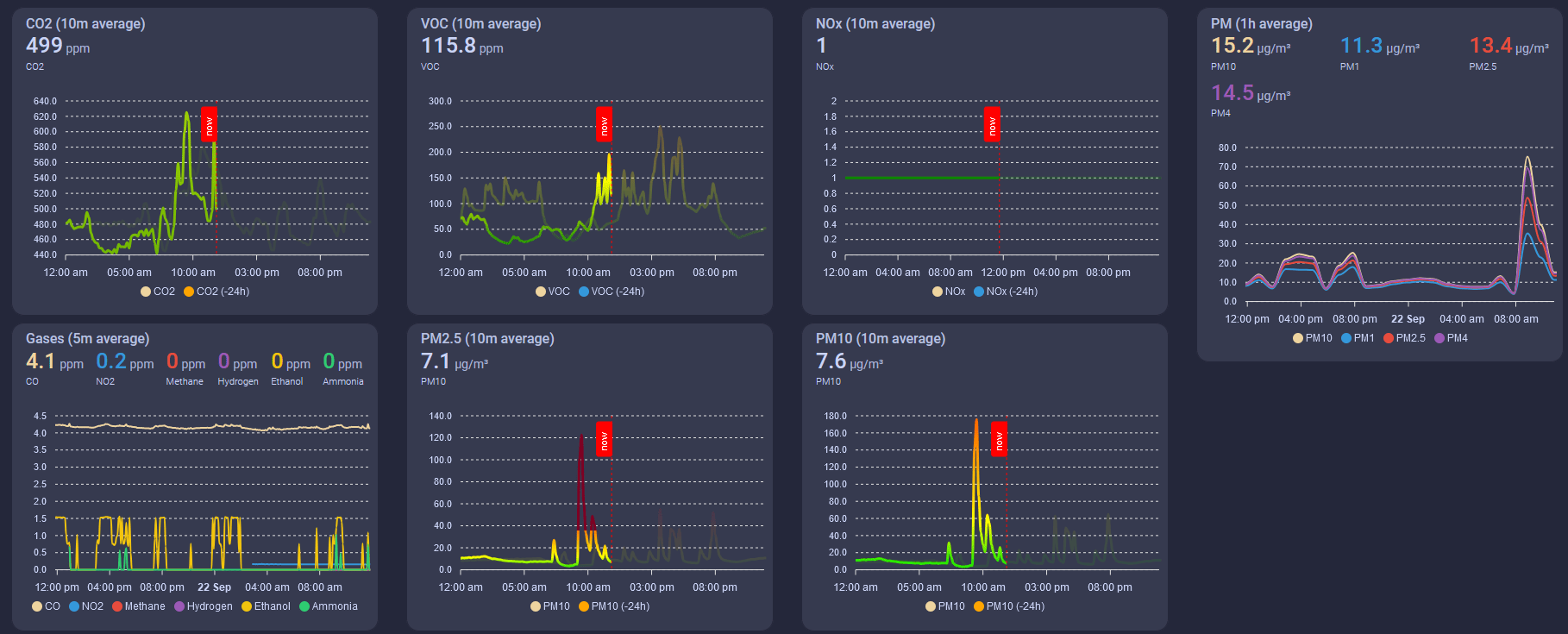
This guide walks you through three stages: install the card, adapt Firstof9's code to your AIR-1, and paste it into your dashboard.
Before you start
This guide assumes you already have HACS installed. If you don't, install HACS first.
Install the ApexCharts card
Every chart on this dashboard is an apexcharts-card, so install the card from HACS first.
1. Go to the HACS tab and search for apexcharts-card. The button below opens the repository in HACS directly.

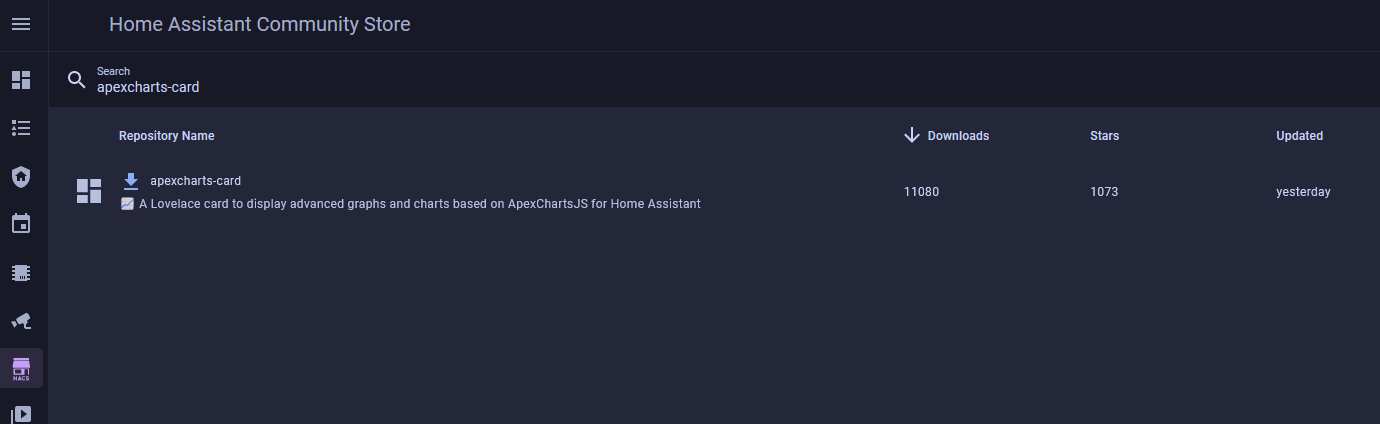
2. Download apexcharts-card.
Once it's downloaded, the card is ready to use in your dashboards.
Prepare the dashboard code
Firstof9's code uses downstairs_air_sensor as the prefix in every entity ID (for example sensor.downstairs_air_sensor_co2). Before you paste the code into your dashboard, swap that prefix for your own AIR-1's.
Change the entity IDs first
If the entity IDs in the code don't match your device, the cards won't work.
Find your entity ID prefix
Your prefix comes from the entity IDs Home Assistant gave your AIR-1. Look it up on the CO2 sensor:
1. Go to Settings → Devices & services → ESPHome and select your AIR-1.

2. Click its CO2 sensor, then the settings cog.
3. Look at the Entity ID, for example sensor.apollo_air_1_ccaac4_co2. The part between sensor. and _co2 is your prefix.
Your prefix uses underscores, not the hyphens shown in ESPHome Device Builder.
Swap in your prefix
The fastest way to change every entity ID in the code is a code editor like Visual Studio Code (VS Code), or an AI assistant like ChatGPT. In VS Code, open Find (Ctrl+F), then select the small arrow to toggle open the Replace box. Find downstairs_air_sensor and replace it with your prefix.
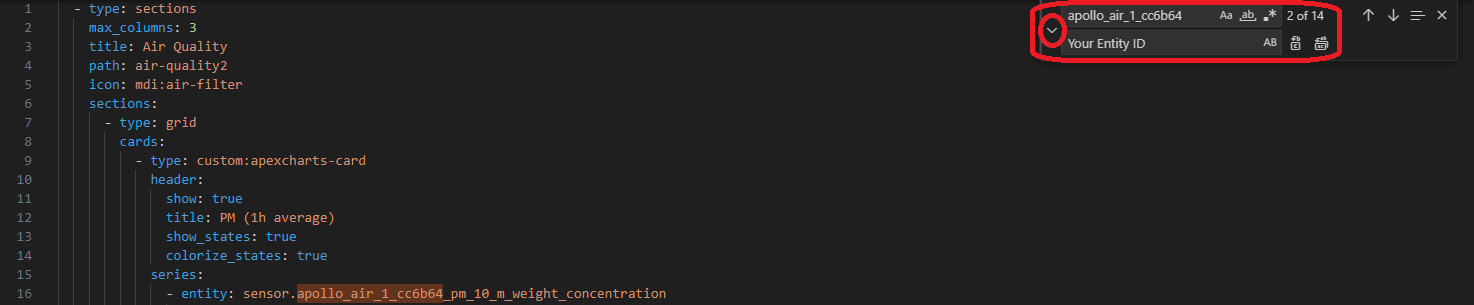
Here's Firstof9's dashboard code. Copy it into your editor and replace the prefix. Once every entity ID matches your AIR-1, the code is ready to paste.
- type: sections
max_columns: 3
title: Air Quality
path: air-quality
icon: mdi:air-filter
sections:
- type: grid
cards:
- type: custom:apexcharts-card
header:
show: true
title: PM (1h average)
show_states: true
colorize_states: true
series:
- entity: sensor.downstairs_air_sensor_pm_10_m_weight_concentration
name: PM10
stroke_width: 2
group_by:
func: avg
duration: 1h
show:
legend_value: false
- entity: sensor.downstairs_air_sensor_pm_1_m_weight_concentration
name: PM1
stroke_width: 2
group_by:
func: avg
duration: 1h
show:
legend_value: false
- entity: sensor.downstairs_air_sensor_pm_2_5_m_weight_concentration
name: PM2.5
stroke_width: 2
group_by:
func: avg
duration: 1h
show:
legend_value: false
- entity: sensor.downstairs_air_sensor_pm_4_m_weight_concentration
name: PM4
stroke_width: 2
group_by:
func: avg
duration: 1h
show:
legend_value: false
- type: custom:apexcharts-card
header:
show: true
title: PM10 (10m average)
show_states: true
colorize_states: true
graph_span: 24h
experimental:
color_threshold: true
span:
start: day
now:
show: true
label: now
color: red
series:
- entity: sensor.downstairs_air_sensor_pm_10_m_weight_concentration
name: PM10
stroke_width: 3
fill_raw: last
extend_to: now
show:
legend_value: false
header_color_threshold: true
group_by:
func: avg
duration: 10min
color_threshold:
- color: rgb(126,0,35)
value: 425
- color: rgb(143,63,151)
value: 355
- color: rgb(255,0,0)
value: 255
- color: rgb(255,126,0)
value: 155
- color: rgb(255,255,0)
value: 55
- color: rgb(0,228,0)
value: 0
- entity: sensor.downstairs_air_sensor_pm_10_m_weight_concentration
name: PM10
color: orange
opacity: 0.3
stroke_width: 3
fill_raw: last
show:
in_header: false
legend_value: false
offset: '-24h'
group_by:
func: avg
duration: 10min
color_threshold:
- color: rgb(126,0,35)
value: 425
- color: rgb(143,63,151)
value: 355
- color: rgb(255,0,0)
value: 255
- color: rgb(255,126,0)
value: 155
- color: rgb(255,255,0)
value: 55
- color: rgb(0,228,0)
value: 0
- type: grid
cards:
- type: custom:apexcharts-card
header:
show: true
title: PM2.5 (10m average)
show_states: true
colorize_states: true
graph_span: 24h
experimental:
color_threshold: true
span:
start: day
now:
show: true
label: now
color: red
series:
- entity: sensor.downstairs_air_sensor_pm_2_5_m_weight_concentration
name: PM2.5
stroke_width: 3
fill_raw: last
extend_to: now
show:
legend_value: false
header_color_threshold: true
group_by:
func: avg
duration: 10min
color_threshold:
- color: rgb(126,0,35)
value: 250.5
- color: rgb(143,63,151)
value: 150.5
- color: rgb(255,0,0)
value: 55.5
- color: rgb(255,126,0)
value: 35.5
- color: rgb(255,255,0)
value: 12.1
- color: rgb(0,228,0)
value: 0
- entity: sensor.downstairs_air_sensor_pm_2_5_m_weight_concentration
name: PM2.5
color: orange
opacity: 0.3
stroke_width: 3
fill_raw: last
show:
in_header: false
legend_value: false
offset: '-24h'
group_by:
func: avg
duration: 10min
color_threshold:
- color: rgb(126,0,35)
value: 250.5
- color: rgb(143,63,151)
value: 150.5
- color: rgb(255,0,0)
value: 55.5
- color: rgb(255,126,0)
value: 35.5
- color: rgb(255,255,0)
value: 12.1
- color: rgb(0,228,0)
value: 0
- type: custom:apexcharts-card
header:
show: true
title: CO2 (10m average)
show_states: true
colorize_states: true
graph_span: 24h
experimental:
color_threshold: true
span:
start: day
now:
show: true
label: now
color: red
series:
- entity: sensor.downstairs_air_sensor_co2
name: CO2
stroke_width: 3
fill_raw: last
extend_to: now
show:
legend_value: false
header_color_threshold: true
group_by:
func: avg
duration: 10min
color_threshold:
- color: '#FF0000'
value: 5000
- color: '#FFA500'
value: 2000
- color: '#FFFF00'
value: 1000
- color: '#008000'
value: 0
- entity: sensor.downstairs_air_sensor_co2
name: CO2
color: orange
opacity: 0.3
stroke_width: 3
fill_raw: last
show:
in_header: false
legend_value: false
offset: '-24h'
group_by:
func: avg
duration: 10min
color_threshold:
- color: '#FF0000'
value: 5000
- color: '#FFA500'
value: 2000
- color: '#FFFF00'
value: 1000
- color: '#008000'
value: 0
- type: grid
cards:
- type: custom:apexcharts-card
header:
show: true
title: VOC (10m average)
show_states: true
colorize_states: true
experimental:
color_threshold: true
graph_span: 24h
span:
start: day
now:
show: true
label: now
color: red
series:
- entity: sensor.downstairs_air_sensor_sen55_voc
name: VOC
stroke_width: 3
show:
legend_value: false
header_color_threshold: true
extend_to: now
fill_raw: last
group_by:
func: avg
duration: 10min
fill: last
color_threshold:
- color: '#FF0000'
value: 400
- color: '#FFA500'
value: 250
- color: '#FFFF00'
value: 150
- color: '#008000'
value: 0
- entity: sensor.downstairs_air_sensor_sen55_voc
name: VOC
opacity: 0.5
stroke_width: 3
fill_raw: last
show:
in_header: false
legend_value: false
offset: '-24h'
group_by:
func: avg
duration: 10min
fill: last
color_threshold:
- color: '#FF0000'
value: 400
- color: '#FFA500'
value: 250
- color: '#FFFF00'
value: 150
- color: '#008000'
value: 0
- type: custom:apexcharts-card
header:
show: true
title: NOx (10m average)
show_states: true
colorize_states: true
experimental:
color_threshold: true
graph_span: 24h
span:
start: day
now:
show: true
label: now
color: red
series:
- entity: sensor.downstairs_air_sensor_sen55_nox
name: NOx
show:
legend_value: false
header_color_threshold: true
stroke_width: 3
fill_raw: last
extend_to: now
group_by:
func: avg
duration: 10min
color_threshold:
- color: '#FF0000'
value: 300
- color: '#FFA500'
value: 150
- color: '#FFFF00'
value: 20
- color: '#008000'
value: 0
- entity: sensor.downstairs_air_sensor_sen55_nox
name: NOx
opacity: 0.5
stroke_width: 3
fill_raw: last
show:
in_header: false
legend_value: false
offset: '-24h'
group_by:
func: avg
duration: 10min
color_threshold:
- color: '#FF0000'
value: 300
- color: '#FFA500'
value: 150
- color: '#FFFF00'
value: 20
- color: '#008000'
value: 0
- type: conditional
conditions:
- condition: or
conditions:
- condition: numeric_state
entity: sensor.downstairs_air_sensor_nitrogen_dioxide
above: 0
- condition: numeric_state
entity: sensor.downstairs_air_sensor_methane
above: 0
- condition: numeric_state
entity: sensor.downstairs_air_sensor_hydrogen
above: 0
- condition: numeric_state
entity: sensor.downstairs_air_sensor_ethanol
above: 0
- condition: numeric_state
entity: sensor.downstairs_air_sensor_carbon_monoxide
above: 0
- condition: numeric_state
entity: sensor.downstairs_air_sensor_ammonia
above: 0
card:
type: custom:apexcharts-card
header:
show: true
title: Gases (5m average)
show_states: true
colorize_states: true
series:
- entity: sensor.downstairs_air_sensor_carbon_monoxide
name: CO
stroke_width: 2
group_by:
func: avg
duration: 5m
show:
legend_value: false
- entity: sensor.downstairs_air_sensor_nitrogen_dioxide
name: NO2
stroke_width: 2
group_by:
func: avg
duration: 5m
show:
legend_value: false
- entity: sensor.downstairs_air_sensor_methane
name: Methane
stroke_width: 2
group_by:
func: avg
duration: 5m
show:
legend_value: false
- entity: sensor.downstairs_air_sensor_hydrogen
name: Hydrogen
stroke_width: 2
group_by:
func: avg
duration: 5m
show:
legend_value: false
- entity: sensor.downstairs_air_sensor_ethanol
name: Ethanol
stroke_width: 2
group_by:
func: avg
duration: 5m
show:
legend_value: false
- entity: sensor.downstairs_air_sensor_ammonia
name: Ammonia
stroke_width: 2
group_by:
func: avg
duration: 5m
show:
legend_value: false
layout_options:
grid_columns: 4
grid_rows: 6
Add the dashboard to Home Assistant
With your code ready, add it to the end of your dashboard's raw configuration. This is where the charts go live.
This editor can wipe out your dashboards
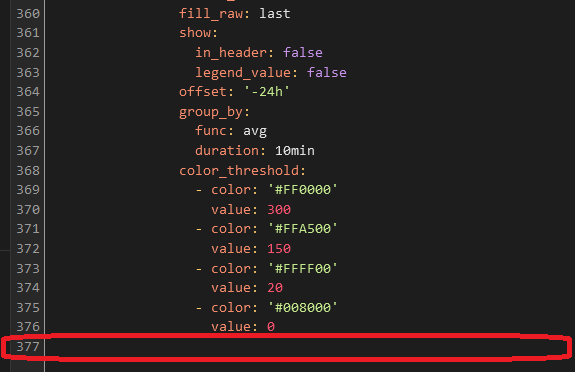
In the raw configuration editor you're editing all of your dashboards at once. If you copy or paste into the wrong place, you could delete other dashboards. Paste only at the very bottom.
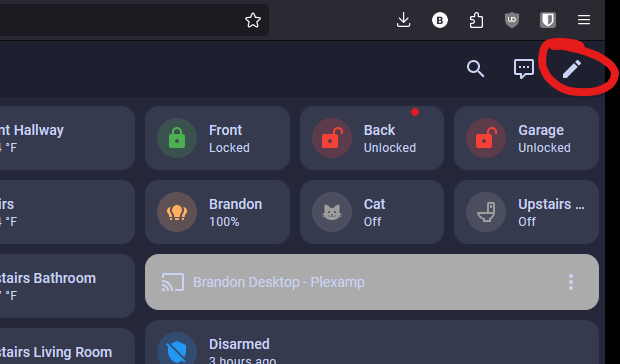
1. Open your dashboard and click the pencil icon in the top right to edit it.
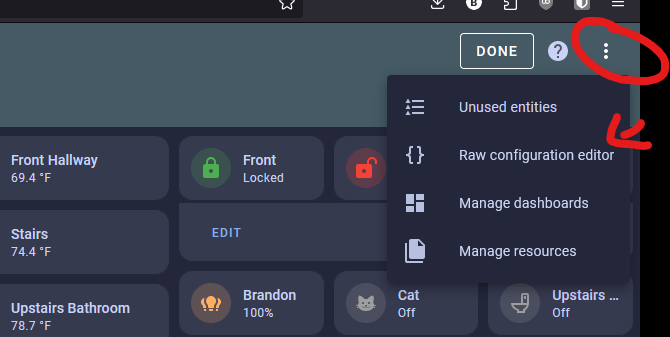
2. Open the three-dot menu and choose Raw configuration editor.
3. Scroll to the very bottom of the editor and paste your edited code on the empty last line.
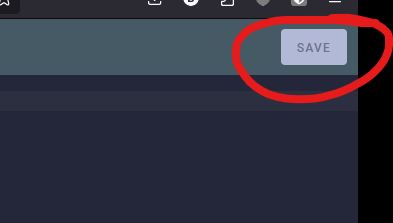
4. Click Save in the top right. Don't click any other buttons or make any other edits before you save.
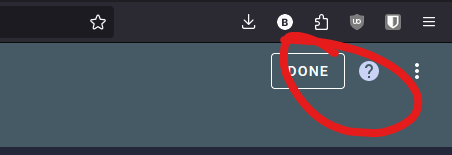
5. Click Done in the top right.
6. Press F5 or refresh your browser, then look for the new air icon among your dashboard tabs and click it.
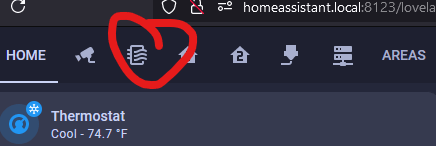
Your AIR-1 readings now fill Firstof9's color-coded charts, and each chart changes color as its sensor's severity level changes.
Thanks
Thanks to firstof9 for creating this dashboard and sharing it.